All-in-One E-Signature & Document Management Platform for Faster Business Growth GET STARTED NOW 👉
Custom branding

Custom Branding for Documents Before

eSignature

Deliver every agreement under your brand with custom branding for electronic signatures. It eliminates third-party platform friction, reinforcing brand credibility, and increasing document completion rates across every transaction.

Trusted by innovative teams
Built for consistency

Key Features of Branding Document
for Electronic Signatures

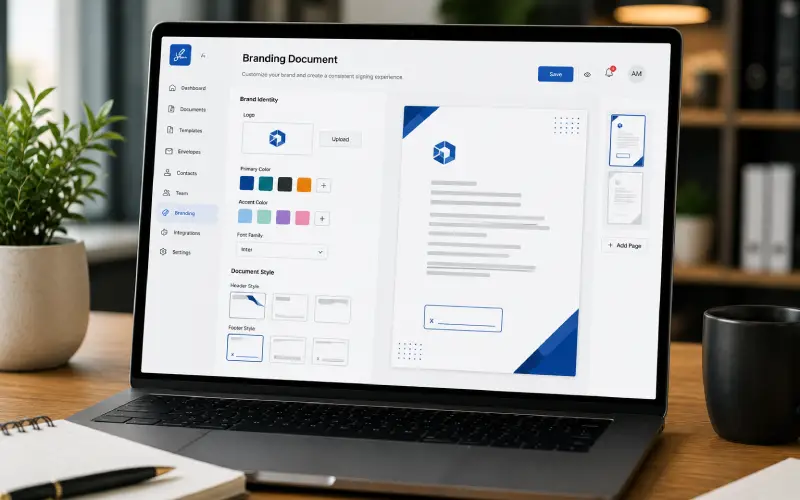
Give your business the flexibility to control how documents and signing communications look, feel, and represent your brand at every stage.

Branded Emails

Customize signing request emails with headers, images, footers, and call-to-action elements that reflect your brand.

Logo & Colors

Add your logo and brand colors across the document and signing interface for a consistent visual identity.

Custom Email Content

Personalize the messaging within signing notifications to make communications more relevant to your recipients.

Brand Profiles

Create distinct profiles for departments, subsidiaries, or client brands while managing them from one account.

eSignature Branding
Document Watermarking

Apply branded watermarks or draft labels to documents during internal review before final signing.

Post-Signing Redirects

Send recipients to your website, thank-you page, or another destination after the document is completed.

Completion Receipts

Add your logo and custom information to completion receipts and audit summaries after signing.

Disclosure Text

Include relevant disclosure and legal text in completion records to keep important information aligned with your business requirements.

Use cases

Use Cases of Custom eSignature
Branding Across Your Business

Standardized custom branding for electronic signatures elevates professionalism across every functional department.

Business Development

eSignature branding issue client proposals, master service agreements (MSAs), and order forms through a branded portal that reinforces brand authority.

Corporate Governance

Deliver compliance policies and NDAs via tailored email workflows featuring official corporate disclaimers and localized legal headers.

Real Estate Business

Custom branding for electronic signatures creates tenant leases and maintenance disclosures through custom-branded web portals that build tenant confidence.

Investor Relations

Using eSignature branding ensures high-net-worth investors and venture partners interact exclusively with your venture firm's visual identity.

Enterprise Purchasing

Standardize vendor agreements, master purchase orders, and RFP submissions across your supply network with custom branding for electronic signatures.

Financial Services

Dispatch loan disclosures, tax authorizations, and wealth management onboarding packets via secure, white-labeled signing interfaces.

Franchise and Partner Operations

eSignature branding issue franchise agreements, operational standard updates, and territory licensing forms using customized multi-brand account structures.

Event Management

Execute sponsorship packages, venue space leases, and talent appearance contracts through custom-styled request portals with eSignature branding.

Start Your Digital Signing Journey!

Get Started
  • Instant signing
  • No credit card required
CTA Illustration

Frequently asked questions

Yes. DOXSIGN supports custom email domain configurations, allowing signature requests to arrive directly from your corporate email domain rather than a generic third-party sender.

Administrators can set up multiple visual brand profiles within a single DOXSIGN master account. You can assign specific branding rules to individual teams or subsidiary organizations.

eSignature branding provides HTML-level customization for email notifications. You can edit the header graphics, button text, footer links, and body copy to align with corporate communications guidelines.

Yes. All custom logos, color palettes, and responsive layouts automatically adapt to mobile smartphones, tablets, and desktop web browsers without breaking layout alignment.

It enables you to implement custom terms of use, guide signers through specific form fields, enforce mobile-only signing, decline or restart workflows, and even allow recipients to print and place a written signature.

To add a logo to your email signature, save a small PNG or JPG file of your logo, open your email settings to the signature editor, use the image insert tool to upload or place the logo, and save your changes.

Yes. You can configure multi-tenant brand hierarchies that give distinct subsidiaries, internal divisions, or client brands their own logos, color palettes, and sender profiles from a single administrative master account.

Yes. Scheduled follow-up reminders automatically adopt your active brand profile maintaining consistent logo headers, custom sender domain headers, and personalized notification text throughout the signing lifecycle.