All-in-One E-Signature & Document Management Platform for Faster Business Growth GET STARTED NOW 👉
Send at scale

Send Documents in Bulk

for Electronic Signature

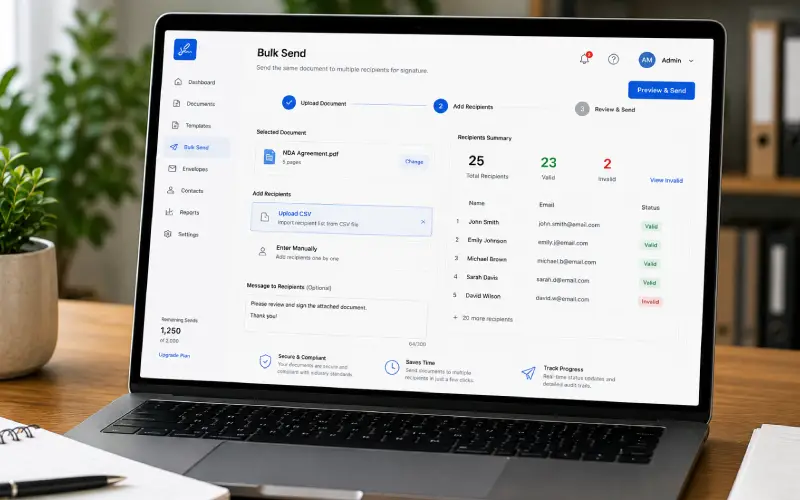
Make bulk document signing simple by sending the same document to multiple recipients in one go, without creating individual signing requests.

Trusted by innovative teams
Built for scale

Key Capabilities That Make
Bulk Send Easier

Go through the highlighted features of our bulk document sending eSignature software and understand their impacts.

Bulk Recipient Import

Upload a complete recipient list at once instead of entering each recipient individually.

Automatic Data Population

Use recipient information to automatically populate the relevant details in each document before sending.

Bulk Request Creation

Create multiple signing requests from a single document without preparing each request separately.

Bulk Send History

Review previous bulk sends and keep track of documents that have already been distributed.

Bulk Send eSignature
Request Expiration

Set a time limit for signing requests so outdated documents do not remain active indefinitely.

Cloud Document Storage

Keep bulk-sent and completed documents securely stored in the cloud for easy access whenever needed.

Custom Recipient Lists

Organize recipients into different lists when the same document needs to be sent to specific groups.

Download Completed Documents

Retrieve completed documents for offline records, sharing, or internal documentation.

Use cases

Where Bulk Send Fits into Your Workflow

Save time on document workflows that involve sending similar documents to multiple people for individual signatures.

Policy & Compliance

Get company policies, compliance forms, and required acknowledgments signed across teams when everyone needs to complete the same paperwork.

Customer Contracts

Distribute service agreements, terms, and customer forms to multiple clients and collect each signed copy independently.

Contract Renewals

Send renewal agreements to customers, partners, or vendors approaching their renewal date and keep recurring paperwork moving.

Employee Onboarding

Send offer letters, employment agreements, and joining documents to new hires without preparing each signing request separately.

Vendor & Supplier Agreements

Speed up supplier onboarding with contracts, declarations, and other documents that need signatures from multiple vendors.

Property & Lease Documents

Distribute lease agreements, renewal paperwork, and property-related forms to multiple tenants when signatures are required.

Membership Renewals

Send renewal forms, membership agreements, or declarations to a large group of members.

Insurance Documentation

Send policy acknowledgments, declarations, or authorization forms to multiple customers or policyholders.

Start Your Digital Signing Journey!

Get Started
  • Instant signing
  • No credit card required
CTA Illustration

Frequently asked questions

Bulk Send allows you to send the same document to multiple recipients at once, creating separate signing requests for each recipient.

Bulk document signing is useful for teams that regularly need signatures from employees, customers, vendors, tenants, members, or other large recipient groups.

The number of recipients you can include depends on your DOXSIGN plan and its configured sending limits.

If CSV recipient import is supported in your DOXSIGN setup, you can upload a recipient list instead of entering names and contact details individually.

Pending requests can be followed up with reminders, helping you keep unfinished documents from being overlooked.

Whether recipients need an account depends on the signing configuration and authentication options enabled for your DOXSIGN workflow.

Bulk document sending software sends customized signature requests straight to the intended recipients. With the bulk shareable eSignature links feature, the document may be signed by anybody with allowed access via a single shareable link.

Instead of preparing and distributing every request individually, you can handle a large recipient list through one workflow, reducing repetitive administrative work.